Color Analysis: Beauty & Style
SL-SolutionsBeauty
5.011.00 Reviews
- Version
- 2.1.6
- Installs
- 10.00K
- Age Rating
- Everyone
Screenshots
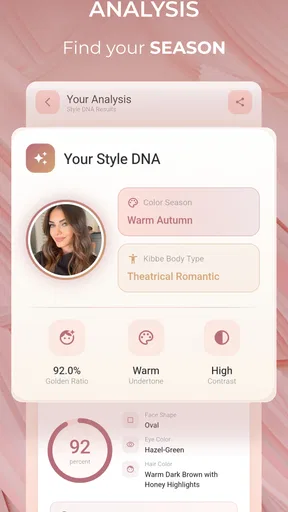
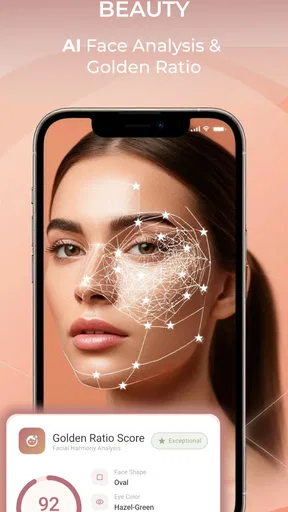
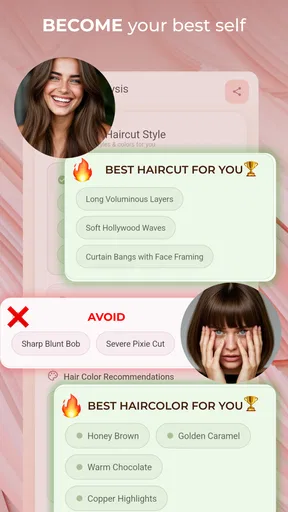
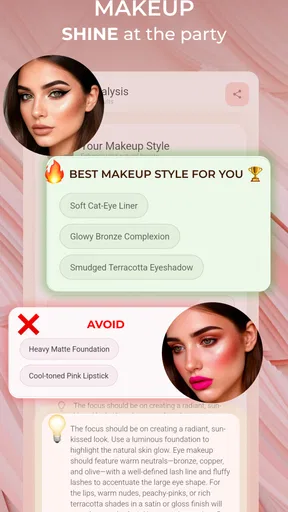
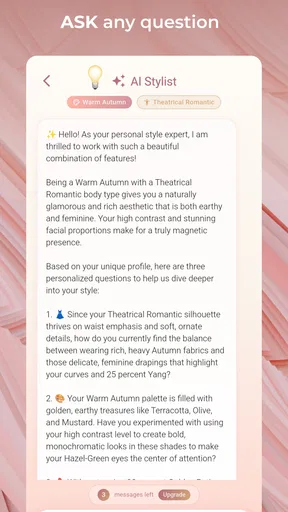
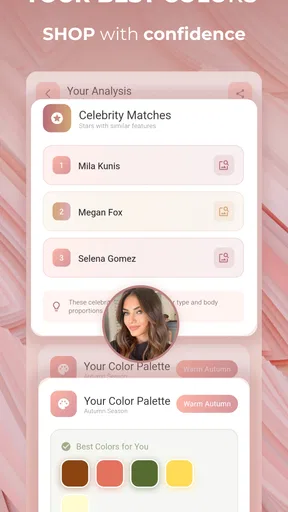
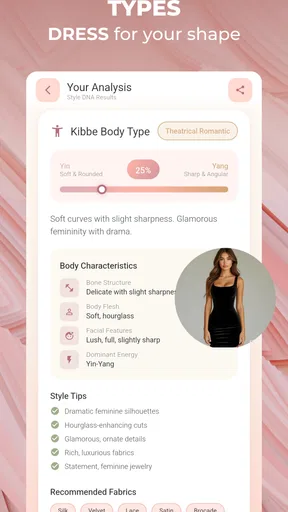
Our Review of Color Analysis: Beauty & Style
 Analysis by Appyee
I tried Color Analysis: Beauty & Style with a practical question in mind: can it help me make a better beauty or clothing decision when I am standing in front of my wardrobe, looking at a haircut reference, or wondering why a certain shade never feels quite right? The app comes from SL-Solutions and sits in the beauty category, with an AI-focused approach to personal color and style guidance.
My first impression was that it is more useful as a starting point than as a final authority. It gives the experience a clear direction: use your appearance as the input, then turn that into suggestions for color, hair, makeup, beauty and fashion. That makes it more focused than a general inspiration board, but it also means the quality of the result depends heavily on the quality of the photo and on how realistically I interpret the recommendations.
The app is free to install and suitable for Everyone, although optional in-app purchases range from $8.99 to $59.99 per item. It has a 5.0 average from around 300 ratings and over 10K installs, which suggests that its audience is still relatively focused rather than enormous. It was released on January 22, 2026, and the current version is 2.1.6, with Android 7.0 or later required.
From a vague style problem to a usable starting point
The most realistic way to use this app is not to open it expecting a complete makeover. I would begin with a specific problem. For example, I might have a wedding coming up and need to choose between a warm coral dress and a cooler rose shade. Or I might be considering a shorter haircut and want a second opinion before showing a stylist a reference image. A clear question makes the output easier to judge.
That starting condition matters because color analysis can quickly become abstract. “What suits me?” is too broad. “Which of these two shirt colors is more likely to work with my overall appearance?” is a much better test. The app’s promise covers several connected areas, but I found the workflow easier to manage when I treated each suggestion as one small decision instead of trying to redesign my entire appearance at once.
I also recommend preparing a neutral photo rather than using the first image available in my camera roll. Strong filters, colored lighting, sunglasses, heavy makeup, and dramatic shadows can all change the visual information an AI system is trying to read. Even without treating the result as scientific, a clean image gives the app a fairer chance to produce advice that feels relevant.
A useful habit is to take the photo near a window during ordinary daylight, with the face visible and the background reasonably calm. I would avoid a bright wall reflecting a strong color onto the skin. This is not a special trick hidden behind a button; it is simply the difference between giving the analysis a stable input and asking it to interpret a heavily altered picture.
Working through the analysis instead of rushing it
The first stage is about turning an image into a personal style direction. I found it helpful to pause at this point and ask whether the recommendation matches things I already know from experience. If certain colors regularly make me look tired, or if some lipstick families always feel too strong, that personal history is valuable context. The app can suggest a direction, but I remain the person who sees the result in different rooms, seasons and outfits.
From there, I would move from broad color guidance to a concrete application. A color family is only useful when it helps me choose something I can actually wear. I might compare it with the clothes I already own, save the suggestion mentally for a makeup purchase, or use it to narrow down hair color references. This is where the app becomes more practical than a simple quiz: the result can be carried into a real decision.
The same approach works for haircut ideas. Rather than asking the app to decide what haircut I should get, I would use its style direction to filter reference images. If a recommendation points me toward a softer or more structured look, I can search for examples with that character and then discuss them with a professional. That handoff is important because an app cannot replace an in-person assessment of hair texture, growth patterns, maintenance time or the exact shape of a cut.
For makeup, I would treat the output as a shopping filter. Instead of buying several products based on impulse, I could look first for shades that sit within the suggested direction, then test them in person when possible. This is one of the better everyday uses because it reduces the size of the search rather than pretending to eliminate uncertainty. Lighting, product finish and personal taste still matter.
Where the suggestions need a human handoff
The most valuable handoff is from the screen to the mirror. A recommendation may look convincing in an app and still feel wrong when I wear it with my usual clothes, glasses or hairstyle. I would check the suggested colors against at least two outfits and, if possible, in both daylight and indoor light. That quick comparison can reveal whether I like the color on me or merely like the color by itself.
The next handoff is to a stylist or makeup professional. For a haircut, I would show the direction I received alongside several reference photos and explain how much daily styling I am willing to do. For makeup, I would tell a beauty adviser which shades I normally find comfortable. The app can help me arrive with a clearer vocabulary, but the professional can adapt the idea to the details that a single image cannot capture.
There is also a handoff to my existing wardrobe. I would not throw out clothes simply because they fall outside a suggested palette. Instead, I would use the result to identify the colors that deserve to be closest to my face, such as tops, scarves or makeup, while keeping less flattering shades for trousers, bags or small accents. That is a more flexible interpretation and avoids turning personal style into a rigid rulebook.
This is one of the app’s less obvious strengths: it can help organize a decision even when I do not follow the result literally. A recommendation becomes more useful when it gives me a comparison point. If I already own a jacket in a questionable shade, I can test it with different tops and accessories instead of assuming the jacket is unusable.
A realistic morning-to-shopping workflow
Imagine I am getting ready for a weekend event. I have a neutral outfit, two lipstick options and a folder of haircut references. I would begin by using a clear, unfiltered image, review the color direction, and then separate the result into three questions: which clothing colors should I try first, which makeup shades deserve a test, and which haircut references share the same overall feeling?
Next, I would compare those suggestions with what I already own. If one recommended color appears in my wardrobe, I can try it immediately rather than shopping. If it does not, I would take the suggestion to a store and compare products under the store’s lighting, then check them again near daylight. The app is most helpful here as a narrowing tool, not as a substitute for seeing the actual fabric or cosmetic finish.
For the haircut, I would avoid booking an appointment based only on the app’s impression. I would bring the references to a stylist and ask what would work with my hair’s natural behavior and my available time. This workflow keeps the app in the role it handles best: helping me articulate a direction before a more detailed human conversation.
Finally, I would take notes on what worked. If the suggested palette helped me choose a flattering top but the makeup advice felt too intense, that does not make the whole analysis useless. It tells me which part of the result fits my preferences and which part needs adjustment. The outcome should be a better decision process, not a demand to obey every recommendation.
What the finished result is good for
The strongest result is increased confidence when I have too many choices. Color Analysis: Beauty & Style gives me a way to move from endless browsing toward a smaller set of possibilities. That is especially helpful for someone who enjoys fashion but struggles to connect inspiration images with their own appearance.
It can also be useful before a purchase. If I am choosing between several similar products, a personal color direction gives me one more filter. This may reduce random buying, although I would still test shades whenever the item is expensive or difficult to return. The app does not remove the need to consider finish, fabric, undertone, comfort or whether the item suits the rest of my wardrobe.
For beginners, the benefit is vocabulary. I may not know how to describe why one shade feels better than another, but a guided analysis can give me a direction to explore. That can make searches for clothing, makeup and haircut references less overwhelming. It is also a gentler way to experiment than making a dramatic change immediately.
I would be more cautious about using it for major appearance decisions. Hair color changes, permanent treatments and expensive wardrobe purchases deserve additional checks. A photo-based suggestion can inspire the conversation, but it should not be the only reason I make a costly or difficult-to-reverse choice.
Where the flow breaks down
The first point of friction is input quality. If the image has unusual lighting or strong makeup, the result may feel less dependable. This is not unique to this app, but it matters because the entire workflow begins with visual interpretation. Taking several photos under similar, ordinary conditions and comparing whether the guidance stays broadly consistent would give me more confidence than relying on one dramatic selfie.
The second limitation is that personal style is larger than color. I might receive a palette that makes sense but still dislike the suggested fashion direction. Someone who prefers black, denim or minimalist clothing may not want a new set of colors to dictate their wardrobe. In that case, I would use the recommendations selectively, perhaps only for accessories or makeup.
The haircut side also has a natural boundary. A visual style suggestion cannot fully account for curl pattern, density, cowlicks, damage, maintenance routines or the time I have before work each morning. A salon consultation is better when the decision involves technique, structure or a major change. The app can help me communicate what I like, but it should not be mistaken for a cutting plan.
There is a financial consideration too. The app is free to start, while optional purchases sit between $8.99 and $59.99 per item. I would explore the free experience first and decide whether the additional guidance solves a real problem for me. The higher end of that range is significant enough that I would want a clear personal use case, such as preparing for a major event or building a more coherent wardrobe, rather than paying simply because I am curious.
People who want a purely manual experience may prefer a traditional color consultant, a makeup counter consultation or advice from a trusted stylist. Those alternatives offer conversation, physical samples and immediate adjustment. A person who already understands their palette may also gain more from a visual inspiration platform than from another analysis.
Who I would recommend it to
I would recommend this beauty app to someone who feels stuck between too many style choices and wants an accessible first pass. It is particularly suitable for experimenting carefully: choosing a lipstick family, organizing clothing ideas, preparing questions for a stylist, or finding a direction before shopping.
I would also recommend it to people who enjoy trying new looks but want a little structure. The app can turn an open-ended makeover project into a sequence: start with a photo, review the direction, test it against existing clothes, then ask a professional or store adviser for the final adjustment. That sequence is more useful than treating the analysis as a verdict.
I would skip it if I expected exact color science, a guaranteed haircut outcome or a complete personal shopping service. I would also skip relying on it alone for a high-cost transformation. In those cases, the better choice is an in-person specialist who can inspect the details that a phone-based analysis cannot fully represent.
Overall, my view is positive but measured. The app works best as a bridge between uncertainty and a real-world style decision. It gives me a practical starting point for color, makeup, fashion and haircut exploration, while the mirror, the wardrobe and a qualified professional remain essential parts of the process.
With its current version 2.1.6 and support for Android 7.0 and later, it is accessible to many Android users. I would install it for experimentation, begin with a careful photo, and avoid treating the first result as permanent truth. Used that way, Color Analysis: Beauty & Style offers enough direction to make everyday beauty choices less random without asking me to surrender my own taste.
Verdict
Strengths of Color Analysis: Beauty & Style
- Useful color guidance for clothing, makeup, and accessory choices.
- Simple interface makes the analysis easy to follow for beginners.
- Personalized palettes can help create a more coordinated wardrobe.
- Helpful reference when shopping for new colors and beauty products.
- Suitable for users exploring seasonal color analysis for the first time.
Limitations of Color Analysis: Beauty & Style
- Results may vary depending on lighting, camera quality, and photo accuracy.
- Some recommendations may feel too general for individual skin undertones.
- Advanced style guidance may require in-app purchases or a subscription.
- The analysis is not a substitute for advice from a professional stylist.
- Users may need to retake photos to receive consistent results.
Other Releases by SL-Solutions
View All
Rock & Crystal Identifier App
Education4.7
Similar Picks in This Category
View All
Beauty Makeup Editor & Camera
Photo & Video Editors - Instant Solution4.7

Perfect365: Face Makeup Editor
Perfect365, Inc.3.5

Mirror Plus - HD Mirror app
Digitalchemy, LLC4.8

Cute Lock Screen & Wallpapers
Prometheus Interactive LLC4.6

HD Camera for Android
One Music Player4.5

Phone Mirror app - True Mirror
Cards4.6
You May Also Like
View All
Frequently Asked Questions
What is Color Analysis: Beauty & Style used for?
Color Analysis: Beauty & Style is designed to help you discover which colors may complement your appearance. It typically evaluates features such as skin tone, hair color, and eye color to suggest suitable clothing, makeup, accessory, and styling shades. The recommendations can be useful when building outfits or choosing cosmetics, although they should be treated as guidance rather than a professional consultation.
How accurate are the app’s color analysis results?
The results can be helpful as a starting point, but accuracy depends on the quality of your photo and the lighting conditions. Natural, evenly distributed light usually produces a more reliable assessment than artificial lighting, filters, or heavily edited images. Because color perception is subjective and cameras can alter tones, you should compare the suggestions with your own preferences and, if necessary, seek advice from a professional stylist.
Do I need to upload a photo to use Color Analysis: Beauty & Style?
Photo access may be required for the app’s main analysis features, since the application needs to examine visible characteristics such as complexion, hair, and eyes. Before continuing, review the permission request and privacy information carefully. Avoid uploading images containing other people or sensitive details unless you understand how the app handles, stores, and processes those photos.
Can the app recommend makeup and clothing colors for different occasions?
The app can provide color suggestions that may be applied to clothing, makeup, jewelry, and general styling. These recommendations can help you experiment with everyday outfits, workwear, seasonal looks, or special-event combinations. However, the available advice may vary by version and subscription plan, and the app may not account for dress codes, cultural preferences, fabric textures, or personal style in the same detail as a human consultant.
Is Color Analysis: Beauty & Style free to download and use?
The application may be available to download at no initial cost, but some features can be restricted behind in-app purchases or a premium subscription. Check the current store listing for pricing, trial conditions, renewal terms, and exactly what is included before starting a trial. If you decide not to continue, cancel through your Android or iOS subscription settings before the renewal date to avoid unwanted charges.
